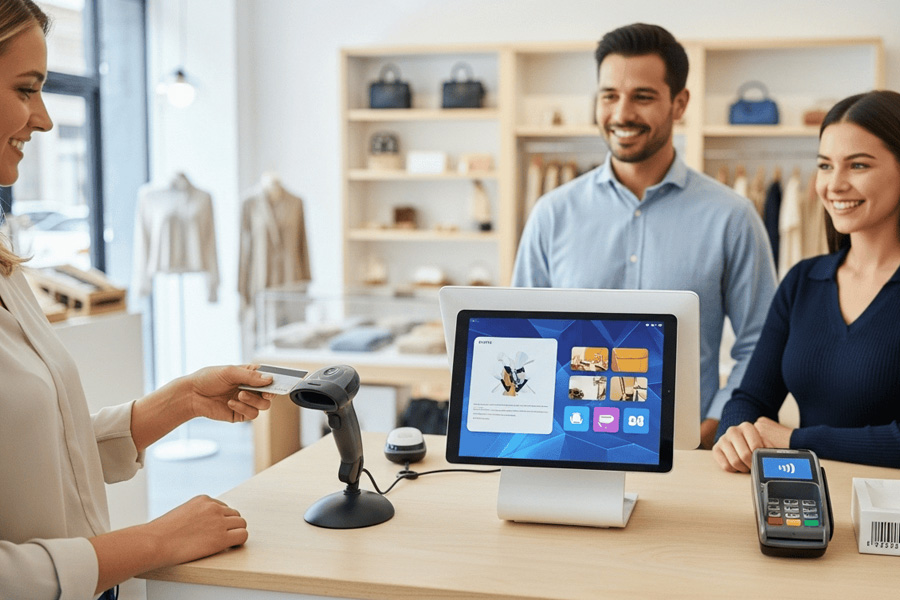
From Cash Drawer to Command Center
Nowadays, POSs are more than calculators. The control room of your storefront brings sales, inventory, payments, and people together. Consider it a shop’s nerve system, sending messages from the counter to the back office and beyond. The appropriate structure links everyday transactions to your bottom line in a store, café, food truck, or repair studio. It tracks sales, updates inventory, reminds you to restock, and shows profits and losses. It also records consumer behavior to help you make better judgments tomorrow.
Core Components You Will Actually Use
A dependable POS is built on two layers: hardware you can touch and software you navigate every hour.
On the hardware side, you will typically see:
- A tablet or touchscreen terminal for the register interface
- A card reader that accepts chip, swipe, and contactless payments
- A barcode scanner for quick item entry
- A receipt printer and cash drawer for cash handling
- Optional scales, label printers, and customer facing displays for specific workflows
In software, the essentials include:
- Product catalog with variants, SKUs, and barcodes
- Inventory control with purchase orders, stock counts, and reorder points
- Sales tools for taxes, discounts, tips, and split tenders
- Customer profiles and loyalty features
- Employee roles, time clocks, and permissions
- Reporting that tracks revenue, margins, and trends
Cloud based systems let you manage from anywhere and sync across locations. Offline mode matters more than it sounds. If your internet blinks, the register should still take card payments, then sync when you reconnect. Do a quick test before day one to ensure failover actually works.
Payments Behind the Counter
The lifeblood of your POS is payments. Most setups allow chip or tap card present transactions and keyed-in phone orders. Contactless mobile wallets save checkout time and friction. Good systems encrypt and tokenize card data to keep sensitive information out of your register.
Settlements and funding speed affect cash flow. Some processors deposit funds the next business day. Others take two or more. Batch cutoff times can shift whether a late evening sale lands in today’s or tomorrow’s deposit. Understand how tips are adjusted after authorization if you run a cafe or salon, and confirm how partial authorizations are handled when customers use prepaid or gift cards.
Fees vary. Your effective rate includes interchange, assessments, and provider markup. Consider rates beyond headlines. Check for monthly minimums, PCI noncompliance, chargeback, and statement fees. Make sure your locale allows cash discounts and surcharges before adding them. The improper setup can cost more than you save.
Inventory, Pricing, and Promotions
Profit is in the details. Name and track items, variations, and modifiers without confusion with a good POS. Set SKUs, scan barcodes, and bundle composite goods. Set reorder points and watch for cash-tying dead stock. Cycle count regularly to match book and shelf.
Pricing should be flexible but managed. Create location or customer group pricing books. Set up tax-inclusive or exclusive pricing for your country. Promotions need structure. Set up buy one get one offers, threshold reductions, expiring coupon codes, and happy hour pricing. Digital and physical gift cards boost brand awareness and repeat business. Log returns and exchanges with cause codes to identify product faults and abuse.
Choosing a POS That Fits Your Shop
Start with your workflow. A coffee bar needs rapid item modifiers and tip prompts. A salon needs appointments and deposits. A boutique needs size and color variants with rich inventory reporting. List the must haves and nice to haves before you take a demo.
Consider:
- Ease of use at peak times
- Integrations with accounting, ecommerce, delivery, marketing, and payroll tools
- Multi location features like centralized catalog and stock transfers
- Hardware flexibility and whether you are locked to one vendor
- Offline resilience and network redundancy
- Contract terms, early termination clauses, and support hours
Budget holistically. Factor subscription plans, per terminal fees, payment processing rates, hardware, extended warranties, and accessories like networking gear. The cheapest sticker price can balloon once add ons and downtime are counted.
Implementation Playbook
Rolling out a POS is a project, not a plug and play shortcut. Treat it like an opening day rehearsal.
- Build a clean product catalog. Standardize names, SKUs, taxes, and categories. Import in bulk, then spot check.
- Set up taxes and rounding rules aligned with your locality. Test edge cases like discounts plus tax.
- Configure printers, cash drawers, and label formats. Map which printer handles receipts versus kitchen orders if you serve food.
- Activate payments and run test transactions for chip, tap, refunds, voids, and returns. Verify deposits land in your bank on schedule.
- Create employee roles with the least privilege necessary. Require unique logins and, if available, two factor authentication.
- Run a pilot shift during a slower window. Script common scenarios, including split checks, gift cards, and no internet.
- Document cash handling and daily close. Use blind cash drops, assign till responsibility, and reconcile at shift end.
- Stage a contingency kit: hotspot, spare cables, paper rolls, and a backup reader. Small things prevent big headaches.
Measuring the Payoff
Track metrics that show real improvement after launch. Average checkout time indicates line movement. Stock turnovers and days on hand indicate cash hoarding. Measure category-specific gross margin, not storewide. Promotions should not consume earnings, therefore watch discount rate as a percent of sales. Before and after cycle counts, track shrinking. To optimize scheduling, analyze labor cost per transaction and sales per labor hour. Retention and repeat visits show loyalty programs’ value. When changing layout or prompts, compare week-to-week instead than guessing.
Use Cases Across Industries
In a coffee shop, modifiers and quick keys are everything. Baristas need to tap size, milk, and extras in seconds, with the receipt printer routing food to the kitchen and drinks to the bar. Tip prompts should be clear but not pushy.
In a boutique, variant management and barcodes speed checkout and reduce miscounts. Seasonal price books let you adjust during sales without touching each item. RFID or handheld scanners can accelerate stock counts.
Mobile vendors like food trucks or market stalls benefit from lightweight readers, tap to pay on a smartphone, and robust offline mode. Battery life and connectivity trump fancy screens on a windy day.
Service studios need deposit handling, prepayments, and integrated appointments. Packages, memberships, and stored cards simplify recurring revenue and cut no shows.
Future of the Countertop
Checkout evolves swiftly. Phone tap-to-pay minimizes pop-up and on-site service hardware needs. QR code payments are touch-free and can link to purchase-related offers. Unified commerce integrates inventory, orders, and customers from online and in-store transactions.
Small teams can improve cash flow with speedier settlements and instant payouts for a charge. Buy now, pay later is migrating from ecommerce to brick and mortar. Tokenized cards and network tokens reduce fraud. Warranties and low-impact summaries that track carbon footprints are added to digital receipts. Machine learning will predict stock, advise purchases, and tailor offers based on visit history without guesswork.
Common Pitfalls to Avoid
Overbuying hardware racks up cost and clutters counters. Match equipment to your actual volume and layout. Ignoring fine print on processing can wipe out margins. Read the contract, ask about surcharges and monthly minimums, and calculate an all in effective rate.
Skipping training slows a good system. Reps should practice peak circumstances, not basics. Do not use one internet route. A backup hotspot is cheaper than a dead line. Secure by default. Use secure logins, passwords, and permissions. Finally, data hygiene negligence will haunt reports. Every dashboard is more reliable with clean catalogs and uniform names.
FAQ
What is the difference between a POS and a payment processor?
A POS manages the entire sales workflow, from ringing up items to tracking inventory and customers. A payment processor handles the movement of funds between the customer’s bank and yours. Many POS platforms include integrated processing, while others connect to third party processors.
How much does a small business POS cost?
Expect multiple cost buckets. The monthly software fee per site or terminal, transaction processing fees, and terminals, readers, and printers are typical. Low upfront hardware costs and high processing rates are offered by some suppliers. Add up the monthly bill, not just one line.
Can I run a POS without internet?
Yes, if your system has offline mode. It can accept card payments and store transactions temporarily, then sync when connectivity returns. Confirm your provider’s limits on offline transaction amounts, how long data is stored, and whether tips and refunds work offline.
How do POS systems handle tips and split payments?
You can enable tip prompts by percentage or dollar amount, adjust tips after the initial authorization if your vertical requires it, and split bills across multiple cards or cash plus card. Test the full flow to ensure accurate reporting and deposits.
What security standards apply to POS?
Your setup should use encryption and tokenization so sensitive card data is not stored in the clear. Follow PCI requirements appropriate to your environment. Limit user permissions, keep devices updated, and use unique logins for each employee.
How long until I receive funds after a sale?
Funding times vary by provider. Many deposit within one to two business days. Cutoff times for batching can shift which day funds arrive. Some services offer same day or instant payouts for an extra fee.
Can I use my existing hardware with a new POS?
Sometimes. Compatibility depends on device models and connection types. Card readers are often proprietary. Printers and scanners may work if drivers are supported. Confirm a compatibility list before committing, or budget for replacements.
How does a POS support both online and in store sales?
Unified systems sync product catalogs, inventory, orders, and customer profiles across channels. When an online order is placed, stock is decremented in real time, and buy online pickup in store workflows are tracked inside the same system that runs your counter.